Microsoft PowerPoint
-
4.3
-
Developer
Microsoft Corporation
-
Category
Productivity
-
Version
16.0.19127.20134
-
Android OS
6
-
Downloads
940M
-
Content rating
3
Microsoft PowerPoint: The Ultimate Presentation Tool on Mobile
Microsoft PowerPoint has long been the go-to application for creating professional and visually appealing presentations. With its mobile app, Microsoft has brought the same powerful features to your smartphone, allowing you to create, edit, and present slideshows on the go. Whether you're a business professional, a student, or someone who frequently needs to present ideas, the PowerPoint mobile app is a must-have tool.
Seamless Integration with Microsoft Ecosystem
One of the standout features of the Microsoft PowerPoint mobile app is its seamless integration with the broader Microsoft ecosystem. The app syncs effortlessly with OneDrive, allowing you to access your presentations from any device. Whether you started your presentation on your desktop or laptop, you can easily pick up where you left off on your mobile device. This level of integration ensures that your work is always up-to-date and accessible, no matter where you are.
User-Friendly Interface
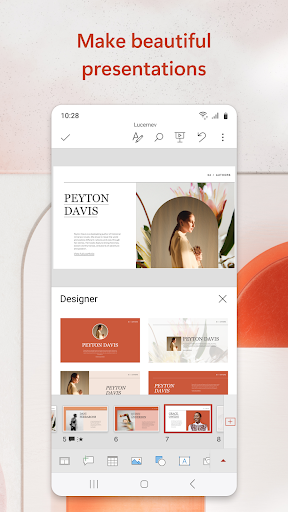
The mobile app retains the familiar interface of the desktop version, making it easy for users to navigate and find the tools they need. The intuitive design ensures that even those who are new to PowerPoint can quickly get up to speed. The app offers a variety of templates and themes, allowing you to create professional-looking presentations with minimal effort. The drag-and-drop functionality makes it easy to add images, charts, and other elements to your slides.
Powerful Editing Tools
Despite being a mobile app, Microsoft PowerPoint doesn't compromise on features. You can perform a wide range of editing tasks, from adding and formatting text to inserting multimedia elements like videos and audio. The app also supports advanced features like animations and transitions, giving you the ability to create dynamic and engaging presentations. The real-time collaboration feature allows multiple users to work on the same presentation simultaneously, making it an excellent tool for team projects.
Present Anywhere, Anytime
One of the most significant advantages of the PowerPoint mobile app is the ability to present your slideshows directly from your phone or tablet. The app supports various presentation modes, including a presenter view that shows your notes and upcoming slides. You can connect your device to a projector or TV using a compatible adapter, or simply present directly from your mobile screen. This flexibility makes it easy to deliver your presentation in any setting, whether you're in a boardroom or a classroom.
Offline Access and Cloud Storage
For those times when you don't have an internet connection, the PowerPoint mobile app allows you to work offline. Any changes you make will be synced to the cloud once you're back online. This feature is particularly useful for travelers or anyone who frequently finds themselves in areas with limited connectivity. Additionally, the app offers generous cloud storage through OneDrive, ensuring that your presentations are always backed up and secure.
Cross-Platform Compatibility
The Microsoft PowerPoint mobile app is available for both iOS and Android devices, ensuring that you can use it regardless of your preferred mobile platform. The app is also compatible with other Microsoft Office apps, such as Word and Excel, allowing you to integrate data and content from different sources seamlessly. This cross-platform compatibility makes it a versatile tool for anyone who uses multiple devices or works in a mixed-device environment.
Conclusion
Microsoft PowerPoint mobile app is a powerful and versatile tool that brings the full functionality of the desktop version to your smartphone or tablet. With its seamless integration with the Microsoft ecosystem, user-friendly interface, and robust editing tools, it's an essential app for anyone who needs to create and deliver presentations. Whether you're working on a business proposal, a school project, or a personal presentation, the PowerPoint mobile app has everything you need to make your slideshows stand out.
Screenshots