Adobe Scan
-
4.2
-
Developer
Adobe
-
Category
Business
-
Version
22.10.11-regular
-
Android OS
Varies with device
-
Downloads
470M
-
Content rating
0
Introduction: Transforming Your Phone into a Powerful Scanner
In an era where digital documentation is king, the need for a reliable, high-quality scanning app has never been greater. Enter Adobe Scan, a free mobile application from the creators of the world-renowned Adobe Acrobat and Photoshop. Available on both iOS and Android, this app leverages advanced AI and optical character recognition (OCR) technology to turn your smartphone’s camera into a professional-grade document scanner. Unlike basic snapshotting tools, Adobe Scan not only captures images but intelligently enhances them, extracts text, and integrates seamlessly with Adobe’s ecosystem. If you’re a student, business professional, or anyone who juggles receipts, contracts, or notes, this app might just become your digital sidekick.
Effortless Scanning with AI-Powered Precision
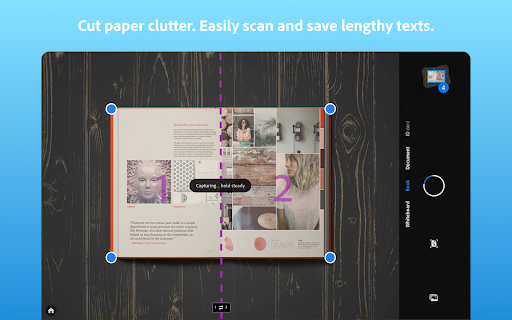
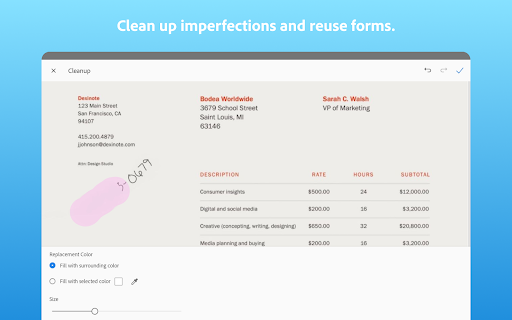
The core of Adobe Scan lies in its ability to automatically detect document edges, correct perspective distortions, and eliminate shadows and glares. Simply point your camera at a document—be it a printed page, whiteboard, or business card—and the app instantly frames, captures, and enhances the image. The results are remarkably clean: text becomes crisp, photos sharpen, and backgrounds turn into a pure, white canvas. This AI-driven processing eliminates manual cropping and adjustments, saving you precious time. For users dealing with receipts or printed materials, the auto-enhance feature ensures that even faded ink or wrinkled paper looks legible. Competing apps often require multiple taps to achieve similar results, but Adobe Scan’s “one-touch” approach sets a new standard for efficiency.
Robust OCR and Text Extraction Capabilities
One of the most compelling features of Adobe Scan is its integrated Optical Character Recognition (OCR). Once scanned, the app automatically converts any embedded text into searchable, editable, and selectable content. This means you can search for specific keywords within a PDF of scanned pages, copy and paste text into emails or documents, or edit the text directly in Adobe Acrobat. The OCR engine is highly accurate, supporting over 25 languages, making it invaluable for multilingual documents. For students, this allows quick extraction of quotes from lecture notes; for office workers, it simplifies digitizing contracts. Unlike many free scanners that require a premium subscription for OCR, Adobe Scan offers this functionality at no cost, giving it a significant edge over competitors like Microsoft Lens or CamScanner in terms of value.
Seamless Integration with Adobe Ecosystem and Cloud
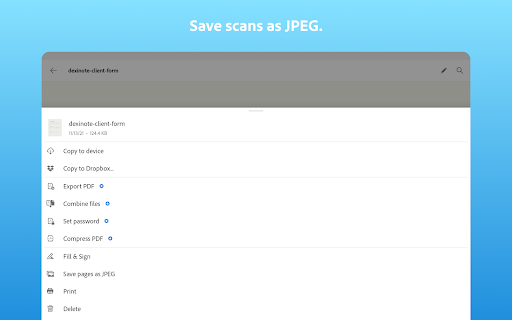
Adobe Scan doesn’t just live on your phone—it syncs effortlessly with Adobe’s suite of tools, including Adobe Acrobat Reader, Adobe Document Cloud, and Adobe Sign. After scanning, you can instantly save your files to the cloud, access them from any device, and even send them for e-signature without leaving the app. This integration is a game-changer for professionals who rely on PDF workflows. For instance, after scanning a signed contract, you can use Adobe Sign to request additional signatures or share the final version via a secure link. The app also supports batch scanning, allowing you to capture multiple pages into a single PDF or Microsoft Word document. While standalone apps like Apple’s Notes offer basic scanning, they lack this deep ecosystem connectivity, which streamlines complex document processes from capture to completion.
User Experience and Design: Intuitive Yet Powerful
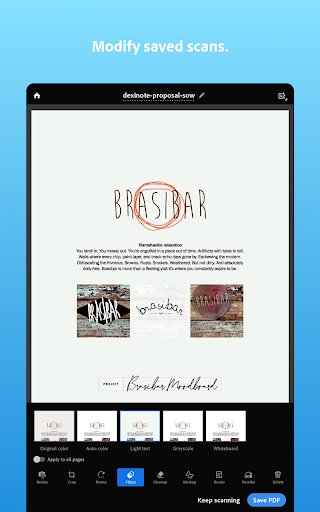
Adobe Scan’s interface is a testament to user-centered design. The home screen is clean, with a prominent capture button and minimal clutter. Tabs for recent scans, custom categories, and cloud files are logically arranged. During scanning, real-time feedback—such as a green outline around detected edges—guides you to optimal results. The app also includes a manual scan mode for tricky documents like curved book pages. Additionally, you can adjust filters (e.g., black-and-white, color, or grayscale) and rename files before saving. The learning curve is near zero: even first-time users can start scanning within seconds. However, the app does require an internet connection for OCR and cloud features, which may be a drawback in offline scenarios. While Google Drive’s scanning feature is simpler and offline-capable, it lacks the advanced OCR and editing tools that make Adobe Scan a more complete solution.
Competitive Landscape: How It Stacks Up
In the crowded mobile scanning market, Adobe Scan stands out for its fusion of intelligence and integration. Compared to CamScanner, which offers similar OCR and enhancement but inundates users with ads and pushes premium subscriptions, Adobe Scan is ad-free and more generous with free features. Against Microsoft Lens, Adobe Scan wins in OCR accuracy and cloud integration, though Lens offers better whiteboard capture modes. For Apple users, the native Notes app provides basic scanning, but its lack of batch processing and advanced export options (like direct Word conversion) limits its utility. The true differentiator, however, is Adobe’s ecosystem: for anyone who uses Acrobat or other Adobe tools, the synergy is unmatched. If you prioritize seamless workflow over standalone features, Adobe Scan is the clear winner.
Final Verdict: A Must-Have for Digital Document Management
Adobe Scan is more than just a scanner—it’s a bridge between the physical and digital worlds. Its AI-enhanced capture, powerful OCR, and deep integration with Adobe’s suite make it a top-tier choice for both casual and professional users. While minor limitations like the need for an internet connection and lack of advanced editing (e.g., redaction) exist, its core offerings are robust and free. For those seeking a single tool to digitize, organize, and share documents effortlessly, Adobe Scan is difficult to beat. Download it today, and turn your phone into the ultimate document hub.
Screenshots